
 By
By 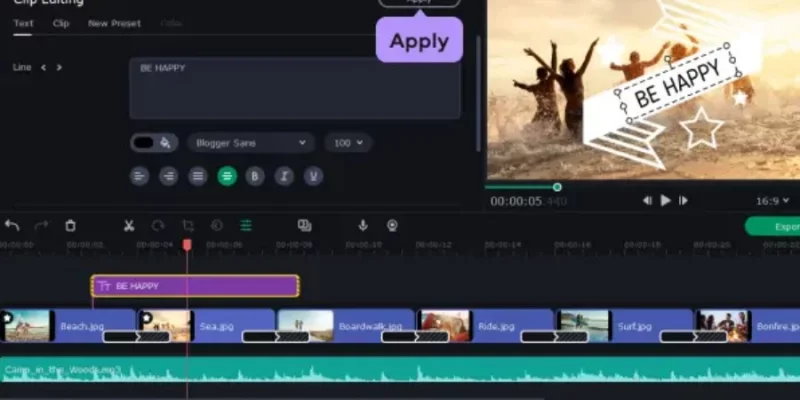
Photos are great—but turning them into a slideshow? That’s how you turn memories into moments that stick. Whether you’re planning a surprise party, reliving your wedding day, celebrating an anniversary, or sending festive greetings, Movavi Slideshow Maker helps you bring it all together with music, effects, and personal touches.
In this blog, we’re sharing five creative ways to use Movavi Slideshow Maker for special occasions, along with tips to help you create slideshows that are fun, emotional, and totally share-worthy.
Why Use Movavi Slideshow Maker?
Before we dive into the creative ideas, let’s talk about why Movavi is a great tool for creating slideshows.
- Beginner-friendly interface: No experience? No problem. Drag-and-drop tools and pre-built themes make it easy.
- Custom transitions and effects: Keep your slideshow smooth, stylish, and full of life.
- Music and voiceovers: Easily add background tracks or narrate your story in your own words.
- Fast export and wide compatibility: Export in formats suited for social media, YouTube, or personal viewing.
Whether you’re making a short Instagram reel or a heartfelt family video, Movavi makes the process quick, fun, and polished.
Create a Surprise Birthday Video
There’s nothing more memorable than surprising someone with a personalized birthday video. Whether it’s sweet, funny, or a mix of both, a birthday slideshow adds a special spark to the celebration.
How to do it:
- Collect childhood photos, goofy clips, and video messages from friends and family.
- Use a bright, festive theme from Movavi’s template collection.
- Add transitions between scenes and text overlays like “Throwback alert!” or “Iconic outfit moment.”
- Sync everything with an upbeat birthday song from Movavi’s built-in audio library or upload your own.
Bonus tip:
Add a final message clip or surprise reveal at the end for that “aww” moment.
2. Make a Wedding Highlights Reel
Turn a day of love into a forever memory. A wedding slideshow can highlight emotional moments, showcase behind-the-scenes memories, or simply act as a visual keepsake for you and your guests.
How to do it:
- Select your best wedding photos and short clips—from getting ready to the dance floor.
- Choose a soft, elegant theme and apply gentle transitions like crossfade or slow zoom.
- Add text overlays for dates, quotes, vows, or even song lyrics that mean something to the couple.
- Use instrumental music or the couple’s first dance song as the background track.
Bonus tip:
Include shots of guests, candid laughter, or funny bloopers to keep it real and relatable.
3. Recap Your Travel Adventures
Why let your travel photos sit in your phone gallery when they could be a mini film? A travel slideshow is a great way to share your journey, whether it’s a weekend escape or a month-long adventure.
How to do it:
- Arrange your media chronologically or by location.
- Add creative titles like “Day 1: Lost in Tokyo” or “Beach Vibes in Bali.”
- Use Movavi’s pan-and-zoom feature to give static photos a sense of movement.
- Overlay it with a vibey soundtrack that matches the mood—chill, upbeat, or cinematic.
Bonus tip:
Throw in short video clips between photos to keep your audience engaged and break up still images.
4. Make a Sentimental Anniversary Slideshow
Celebrate years of love, laughter, and life together with an anniversary slideshow that captures your journey. Whether it’s for a partner or a surprise for a couple you love, this type of slideshow is all heart.
How to do it:
- Gather photos from over the years—first dates, travels, holidays, quiet moments.
- Choose a warm theme and use soft transitions to create a romantic mood.
- Add overlays with dates, milestone captions, or simple notes like “Year 5: Our favorite trip.”
- Use a meaningful love song or even a custom voiceover narrating the story.
Bonus tip:
End with a message about the future—like a shared dream, a plan, or an inside joke.
5. Design a Festive Holiday Greeting Video
Forget traditional holiday cards. A festive slideshow lets you send warm wishes with a personal, creative twist—perfect for sharing with family, friends, or coworkers.
How to do it:
- Use family photos, clips of decorating, cozy home moments, or festive events.
- Add seasonal elements from Movavi’s sticker and transition library—think snowflakes, twinkle lights, or Santa hats.
- Choose cheerful background music or record a heartfelt voiceover with a holiday message.
- Customize with text overlays like “Happy Holidays from the Smiths!” or “2025: More Cocoa, Less Chaos.”
Bonus tip:
Include outtakes or funny clips to make it extra entertaining and real.
Quick Tips for a Better Slideshow
Want to take your slideshow from “nice” to “nailed it”? Keep these tips in mind:
- Keep it concise: 2–4 minutes is the sweet spot—long enough to tell a story, short enough to keep attention.
- Use consistent transitions: Too many styles can feel messy. Stick to 1–2 types for a cleaner look.
- Balance text and visuals: Let the photos shine. Keep text short, sweet, and supportive.
- Sync to music: Cut scenes or add transitions to match the beat—it’s subtle, but makes a big impact.
- Preview before exporting: Always watch the full preview to catch any typos or awkward cuts.
Conclusion
Special occasions deserve more than just a few photos—they deserve to be remembered, shared, and celebrated. Whether you’re making someone cry happy tears on their birthday or reliving a travel adventure, Movavi Slideshow Maker turns your moments into something magical.
Fast, easy, and fun to use, Movavi helps you turn every photo and clip into a story worth telling. So go ahead—create, share, and relive your favorite moments in style.
For more information, visit Atnook.




Comments